
This article will explain digital television and how to convert your old television set to receive both HDTV and SDTV signals through your rabbit ears, OTA (Over the Air and Free). For those with cable and/or satellite, your cable company will do all the work for you, but you may find this article interesting as you’ll learn how to get the best HD picture that is free too.
I originally wrote this when Americans were switching over to digital TV. Today, Canadians and people from other countries will find this useful as well. You can still use your old TV and still get free TV — with even better picture than you’re used to now — assuming you don’t live in one of those cities where the analogue transmitters will not be replaced with digital ones with the CRTC’s blessings. digitalhome.ca has a forum and a link that tracks DTV availability in Canada. You can complain to your local television station and to the CRTC if you see your town or area will no longer be served free OTA TV.
What is digital television?
In the old days, television signals were broadcast over the air via an analogue signal. Analogue television in North America used the NTSC or National Television System Committee system. Every television came with an NTSC tuner inside, ready to receive and show the analogue signals that your local television station was putting out.
However, a better system emerged. Digital television or DTV. For the purposes of this article, I won’t go into a technical explanation of what digital signals are and how they differ from analogue, but suffice it to say that digital television is stupendously better than analogue in all ways but one.
Standard digital (SD) television provides a clear picture with more lines of resolution than analogue. In the high definition or HDTV version, it provides such clarity that you can see the disappearing puck or the blades of grass on a golf course. Your eyes will like both SDTV and HDTV.
Digital television always provides a crystal-clear picture, except when the signal is disrupted by weather or a blockage. In which case, there’s no picture, no sound. At best you’ll see an unwatchable mirage of squares all merging and moving. Analogue television becomes unwatchable in degrees, which is better when trying to watch a station with a poor signal. Even when the weather is bad, you can still see and hear well enough with analogue to watch your show. Not so for digital. It’s either “on” or “off.” That’s the only way it’s worse than analogue. Otherwise it’s worth the switch to digital!
In the old NTSC system, each station broadcast on a whole-number channel. In the new digital ATSC system (Advanced Television Systems Committee), each station can broadcast several sub-channels under its one main channel because it can go into one decimal place. Huh?
So, for example, PBS in my local area broadcasts three sub-channels on channel 17. Its HDTV signal goes out on channel 17.1; its SDTV signal goes out on 17.2; and its ThinkBright channel goes out on 17.3. (I’d never heard of ThinkBright before, but it looks like it has good learning programs for all age groups not just kids.) Separating its HDTV from its SDTV signals on two separate sub-channels provides benefits to viewers with old sets like mine. Those who want to see their entire screen filled with a picture can watch 17.2. Those who want to see a show in HDTV can select 17.1.
The other nifty benefit of digital television is a guide. The converter box’s remote control will have a Guide and Info buttons. These work just like the Guide and Info buttons for cable TV. By pressing these buttons, you will see useful information like date and time, title of the show, a description, and what’s coming up next. US stations provide more info than Canadian stations with the Guide button.
So now that you know what it is, how do you get it?
Is your TV a DTV?
Why rabbit ears work
How to get that digital signal
In trying to figure out how to see digital television on my 20-year-old set, I read a lot about how I’d need a digital antenna or a special antenna. Not true.
 There is actually nothing special about the antenna you’ll need to see digital television. You see, stations are broadcasting their digital signals on the UHF spectrum, that is channels 14 to 69. You’ll probably already be familiar with UHF because television stations have been broadcasting on those frequencies for years. In the Toronto area, several stations broadcast on UHF: Citytv, Global, OMNI (both 1 and 2). In the Buffalo area, Fox is the best-known UHF station, and there’s also the CW.
To go digital, all the stations had to go onto a different frequency from their usual one. The most dramatic changes are the ones who traditionally broadcast on the VHF band, stations like CBC on channel 5 or CTV on channel 9 or in the US CBS on channel 4 or ABC on channel 7. However, their change in frequency location from VHF to UHF makes no difference to you in how you receive them. If your rabbit ears pull in your local UHF stations nicely, then your rabbit ears will pull in the new digital channels.
But if your rabbit ears do a lousy job in pulling in UHF stations, then you’ll need to look for a new antenna (or rabbit ears). The rabbit ears part of the antenna is actually the part that pulls in the VHF signals. Although there is some debate about whether you’ll need to have a VHF antenna anymore, prudence dictates you get an antenna that can still pull in VHF. Besides which, I cannot imagine any company or public service allowing all that frequency real estate going to waste!
The circle or bowtie part of your antenna is the part that pulls in UHF signals. My UHF looks like a mini-satellite dish. No-one can tell you which antenna works best because it differs from location to location, even moving a step can change which antenna works best. VHF is easier to pull in than UHF, for UHF is extremely directional. That means it isn’t swirling all around you; it’s coming towards you from exactly one direction, and you need to orient your antenna to that direction. But I’ve discovered that that direction is not intuitive. For example, it took me a long time to realise my UHF comes in my window at an angle, bouncing off one wall, and it’s that wall where my antenna needs to be near.
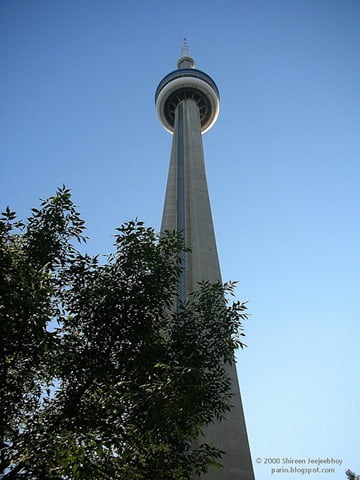
In Toronto, the CN Tower broadcasts all our Canadian stations. (For those who haven’t seen the formerly tallest freestanding tower in the world, I’ve included a photo of the CN Tower.) So you’d think that the digital signals of all these stations would be coming towards me from the same direction with the same power, and all I’d have to do is point my antenna towards the Tower and voila, I’d get all the Canadian digital channels. Ha! Just as you have to move your antenna around when switching from one UHF station to another, you have to do the same to go from one digital channel to another. Digital CTV pretty much comes in no matter what my antenna is doing. On the VHF band, CBC is clear as a bell. On its digital UHF band, it’s persnickety as all get out. Citytv is as usual weather dependent, and Global is OK. All of these are broadcast from the CN Tower. On the other hand, the American (Buffalo) stations broadcast from different locations with different power at different heights and towards different directions. Despite that, I’m actually getting CBS and NBC for the first time now that they have new towers to broadcast their digital signals. I was told that fog off Lake Ontario is a bigger interference source than rain or snow. And that some of the Canadian stations are using temporary digital transmitters until the switchover date, at which point they’ll for sure begin to use higher-powered, permanent transmitters. Unfortunately, I have also learnt that not every analogue transmitter will be switched to digital, and so small cities like London will no longer receive CBC, our public broadcaster, over the free airwaves. But I digress.
Some people are all for amplified antennas, others say it makes no difference. If the signal coming in is weak, then the amplification will just make your picture noisier. But if the signal coming in is good and strong, then amplification will make a difference. However, location is still the most important factor — both your home’s location (rural or urban, high or low, facing north or south) and your antenna’s location in your home.
Americans have access to a nifty website that helps them determine which stations they’ll be able to receive in digital and how well, depending on their address. Canadians have no such service unfortunately. But a Toronto website does provide very useful information to help those in southern Ontario determine which stations are possible to get.
One other thing to know is that sometimes an indoor antenna will just not work. An outdoor antenna will always work better, and in some situations, may be your only option. Even if your rabbit ears work well, an outdoor antenna will provide reliable and stronger signals to your TV. Since poor or fluctuating digital signal quality (e.g., when fog is over the lake or a storm is thundering through) means a picture that is unwatchable or just gone, unlike with analogue, try to get an outdoor antenna installed. I can’t advise on outdoor ones, other than to tell you they are apparently easy to build if you’re a do-it-yourselfer and sometimes all you need to do is stick your antenna on your balcony or out your window for it to work better. In the Toronto, Vancouver, Calgary, Winnipeg, Montréal, and San Francisco areas, saveandreplay.com sells antenna equipment, converter and ATSC tuner boxes, as well as provides installation services in Toronto (call for installation in other areas).
To sum it up, all you need is a standard indoor antenna or rabbit ears. And if you’re used to dealing with your UHF channels, you’re ready to deal with the new digital channels.
Checking up on your antenna
What to look for in a converter box
PBS gives great tips on going digital. Here’s one applicable to Canadians who don’t have to switch to digital until 2011 and Americans who live near low-power television stations.
The converter box
Connecting it to your TV and Antenna
 To convert your old television set to receive digital television, you’ll need a converter box. The box enables your television to receive the new ATSC signals. So look for something called an ATSC Converter Box.
If your set is digital or HDTV and has an ATSC tuner in it, then you can skip this step.
In Toronto, I found only one converter box at Best Buy: the Coby ATSC Converter Box. Despite the usual hard-to-understand manual, it’s actually quite simple. Put your box between your antenna and your TV.
First, unhook your antenna from your TV or VCR and then plug the antenna cable in to the RF In plug (see photo). Note carefully where the antenna was plugged in to your TV before pulling the cable out.
The second step you can do in two ways. If you have a newer set with a composite video input, you can use the enclosed video cable — the one with three coloured plugs at each end — to connect the box to your television. However, my set was too old. So I used the enclosed RF cable — the all-black one with a single plug at each end — to connect the box to the television. That cable plugs in to exactly where your antenna used to be plugged in to your TV set.
The last thing you’ll need to do is to switch the channel selector at the back of the converter box to channel 3 or 4. I switched mine to channel 3. Then turn on your TV and switch your television to channel 3 or 4, the same one as on the converter box. I switched my television to channel 3.
You’re almost done.
Setting up the digital channels
Now that all your cables are plugged in correctly, it’s on to the next step.

Turn your TV off again. Plug your converter box into an electrical outlet. Put the batteries into its remote. Turn on the box with the remote to ensure the remote is working. Turn on the TV. It is important that you always turn the box on first otherwise the picture might be total static if you do it the other way around. I have no idea why.
You will see a menu come up on your screen. If you don’t see it, it’s because your TV is not tuned to the same channel as you selected on the converter box.
The first thing you’ll need to do is have the box scan for available channels, using the AutoScan (or something similar) menu selection. Refer to your box’s manual for how to select from the menu with your remote control. It will take a few minutes to scan through all the channels from 14 to 69 and add any to your channel list where it finds a signal.
Please note that if you have a VCR hooked up to your TV, it will substantially reduce how many channels you will see. That is why I have not given instructions on how to hook the box up to a VCR-TV combo. (I also don’t remember how!)
Once the AutoScan is done you have your initial list of channels. Now to build on that list.
Finding available digital channels
The AutoScan feature will find some of the digital channels, but may not find all that are available to you. At this point, have in front of you a list of the channels available in your area (see section above on Rabbit Ears). You will have gotten this list earlier from either antennaweb.org if you’re in the US or RemoteCentral.com if you’re in the southern Ontario region. Compare the channels on your list to the ones the AutoScan feature picked up.
If there are any missing, use Manual Scan to pull them in and be ready to move your antenna around. If you’re close to the CN Tower or a powerful transmitter and using an outdoor antenna, you may need to add an attenuator or two to your cable coming in so that your converter box can handle the power. Before you begin your manual scan, you will have to wrap your head around the fact that each station will have two frequency numbers associated with it. It took me awhile to understand this part. The digital number is its assigned frequency — that will be the number you need to find when you’re scanning channels manually. The other number is the one you’re used to associating a particular station with.
So, for example, PBS in Buffalo is channel 17. But on the digital band it’s 43. Using your converter box remote, select Manual Scan then select the number box and click the up (or down) arrow until you reach 43. Stop and wait for it to find the signal. If it doesn’t, move your antenna. You will see a bar beneath the number that shows how strongly you’re receiving it. I found that at 1/3 the way to good or better, the channel usually came in. If the menu disappears, click the Menu button on your converter box’s remote control to bring it back and once again choose Manual Scan. And try again to bring in channel 43. Once you’ve got the signal, you can enter it into the channel lineup by pressing Enter or whatever the appropriate key is for your converter box. Once entered, the box will change its number to 17, the one you’re familiar with, and change the order to the channel order you’re familiar with. The other thing you will notice is that with PBS, it will add three sub-channels. So when you’re scrolling through your channels, it won’t necessarily be one click to go from station to station; it might be two or three as you move through a station’s sub-channels. None of the Canadian stations have sub-channels yet, and not all the American ones do either.
You might notice at this point that your picture is kind of small with a big black border all around. That’s the aspect ratio. Your converter box Menu will have an Options section where you can change the Aspect ratio. The default is to let the program pick. This really only works when a station has an HDTV sub-channel and an SDTV sub-channel. The SDTV sub-channel will fill your screen with a 4:3 or traditionally shaped picture. The HDTV channel will fill your screen horizontally but will have a black band above and below the picture. The problem arises when a station has only one channel. When it’s broadcasting in HDTV, the screen will be fine. When it’s broadcasting in SDTV, you’ll have to change the aspect ratio to Zoom to fill the screen.

That’s it! Sit back and enjoy your brand new TV, courtesy of digital television. Next time, I’ll share my outdoor antenna installation experience.
(Originally published on Squidoo by me on 8 May 2009 transferred here to my website 21 January 2012)
—————————–
Reader Feedback from 8 May 2009 Squidoo Version of This Article:
baby-strollers Dec 17, 2011 @ 6:22 pm
The time has come, can’t hardly get any channels on my TV without the digital box it seems?
edward Dec 7, 2011 @ 10:24 pm
Hi ShireenJ,
I was able to get signal from several stations from my area (Orleans, Ontario) using your
suggestions. Thanks. Ed
edward chiu Dec 6, 2011 @ 8:30 pm
I have a HDTV that has two inputs support analog(NTSC) and digital (ATSC) off air antenna signals and analog and digital cable TV(QAM) signals. I recently bought the YERK HDTVa antenna, but when I connected to the HDTV, there is no signal. I live in Ottawa, Ontario,Canada. Why ?
Reply: Shireen Dec 7, 2011 @ 6:28 pm
Edward: you would need to connect your antenna into the ATSC input. Then set your TV through its menu system to accept antenna (sometimes they’re preset to cable). And lastly have the TV automatically scan for channels. Also find the location of your local TV transmitters and put your TV in the window that points in that direction. For example, in Toronto the CN Tower at the south end of the city is the main TV transmitter, so I’d point the antenna south through a south-facing window. I hope that helps.
Reply: edward Dec 7, 2011 @ 10:29 pm
Thanks. It worked. Ed
Mae Morgan Jan 25, 2011 @ 11:06 am
With the new indoor antennas, for an old analog tv, do you have to have the converter box? Or is that what the new listings on the boxes are? uhf, hdtv and vhf does this take the place of the “converter boc”?
Reply: ShireenJ Jan 25, 2011 @ 11:27 am
Yes, you still have to have the converter box. The box takes the digital signals from over the air and converts them to analog so your TV can “read” them. I’m not familiar with the new listings, but the channel numbers are the same as the analog ones. So if you watch channel 2 on analog, it’ll be 2 or 2.1 on digital (2.1 if channel 2 has two or more subchannels — as you scroll up, you’ll then see 2.2 and/or 2.3). UHF and VHF refer to the frequencies of the channels. Digital is only on UHF, thus the need for a UHF antenna. HDTV refers to the resolution — high-definition television — that is, more dots per inch on your TV. The converter box takes the UHF digital signals, converts them to UHF analog signals, and shows the picture on your television. Depending on what the network is broadcasting, the resolution you’ll see will be either standard definition (SD) or HDTV. However, to actually see the full quality of the HDTV, you’ll need a new television. The old analog TVs can’t show the full resolution. They didn’t make em that way. They will be able to show the full picture size though, and it’ll look way better than what you’re used to anyway. Hope that helps!
jamiew23 May 8, 2009 @ 11:46 am
5 stars from me. Thought the content was brilliant, pictures are very good and videos are great too. Couldn’t do better myself 🙂 Well done!!!
